Explain call(), apply() and, bind() methods

 call()


It’s a predefined method in javascript.

This method invokes a method (function) by specifying the owner object.

Example 1:

function sayHello(){
  return "Hello " + this.name;
}
        
var obj = {name: "Vijay"};
        
sayHello.call(obj);
        
// Returns "Hello Vijay"
          

call() method allows an object to use the method (function) of another object.

Example 2:

var person = {
  age: 23,
  getAge: function(){
    return this.age;
  }
}
        
var person2 = {age:  54};
person.getAge.call(person2);
        
// Returns 54  

call() accepts arguments:

function saySomething(message){
  return this.name + " is " + message;
}
        
var person4 = {name:  "Vijay"};
        
saySomething.call(person4, "awesome");
// Returns "John is awesome"    

apply()

The apply method is similar to the call() method. The only difference is that,

call() method takes arguments separately whereas, apply() method takes arguments as an array.

function saySomething(message){
  return this.name + " is " + message;
}
        
var person4 = {name:  "Vijay"};
        
saySomething.apply(person4, ["awesome"]);

bind()

This method returns a new function, where the value of “this” skeyword will be bound to the owner object, which is provided as a parameter.

Example with arguments:

var bikeDetails = {
    displayDetails: function(registrationNumber,brandName){
    return this.name+ " , "+ "bike details: "+ registrationNumber + " , " + brandName;
  }
}
        
var person1 = {name:  "Vijay"};
        
var detailsOfPerson1 = bikeDetails.displayDetails.bind(person1, "TS0122", "Bullet");
        
// Binds the displayDetails function to the person1 object
        
        
detailsOfPerson1();
// Returns Vijay, bike details: TS0452, Thunderbird

What this keyword

 The “this” keyword refers to the object that the function is a property of.


The value of “this” keyword will always depend on the object that is invoking the function.

Confused? Let’s understand the above statements by examples:
function doSomething() {
  console.log(this);
}
        
doSomething();

What do you think the output of the above code will be?

**Note - Observe the line where we are invoking the function.


Check the definition again:

The “this” keyword refers to the object that the function is a property of.


In the above code, function is a property of which object?

Since the function is invoked in the global context, the function is a property of the global object.

Therefore, the output of the above code will be the global object. Since we ran the above code inside the browser, the global object is the window object.

Example 2:

var obj = {
    name:  "Vijay",
    getName: function(){
    console.log(this.name);
  }
}
        
obj.getName();

In the above code, at the time of invocation, the getName function is a property of the object obj , therefore, the this keyword will refer to the object obj , and hence the output will be “Vijay”.

Example 3:

 var obj = {
    name:  "Vijay",
    getName: function(){
    console.log(this.name);
  }
        
}
        
var getName = obj.getName;
        
var obj2 = {name:"Mukesh", getName };
obj2.getName();

Can you guess the output here?

The output will be “Mukesh”.

Although the getName function is declared inside the object obj , at the time of invocation, getName() is a property of obj2 , therefore the “this” keyword will refer to obj2 .

The silly way to understanding the this keyword is, whenever the function is invoked, check the object before the dot . The value of this . keyword will always be the object before the dot .

If there is no object before the dot like in example1, the value of this keyword will be the global object.

Example 4:

var obj1 = {
    address : "Mumbai,India",
    getAddress: function(){
    console.log(this.address); 
  }
}
       
var getAddress = obj1.getAddress;
var obj2 = {name:"mukesh"};
obj2.getAddress();    

Can you guess the output?

The output will be an error.

Although in the code above, the this keyword refers to the object obj2 , obj2 does not have the property “address”‘, hence the getAddress function throws an error.

Explain Higher Order Functions in JavaScript

 Functions that operate on other functions, either by taking them as arguments or by returning them, are called higher-order functions.


Higher order functions are a result of functions being first-class citizens in javascript.

Examples of higher order functions:

function higherOrder(fn) {
  fn();
}
     
higherOrder(function() { console.log("Hello world") }); 

function higherOrder2() {
  return function() {
    return "Do something";
  }
}
        
var x = higherOrder2();
x()   // Returns "Do something"

What is an Immediately Invoked Function in JavaScript?

 An Immediately Invoked Function ( known as IIFE and pronounced as IIFY) is a function that runs as soon as it is defined.


Syntax of IIFE :

(function(){ 
  // Do something;
})();

To understand IIFE, we need to understand the two sets of parentheses which are added while creating an IIFE :

First set of parenthesis:

(function (){
   //Do something;
})

While executing javascript code, whenever the compiler sees the word “function”, it assumes that we are declaring a function in the code. Therefore, if we do not use the first set of parentheses, the compiler throws an error because it thinks we are declaring a function, and by the syntax of declaring a function, a function should always have a name.

function() {
  //Do something;
}
// Compiler gives an error since the syntax of declaring a function is wrong in the code above.

To remove this error, we add the first set of parenthesis that tells the compiler that the function is not a function declaration, instead, it’s a function expression.

Second set of parenthesis:

(function (){
  //Do something;
})();

From the definition of an IIFE, we know that our code should run as soon as it is defined. A function runs only when it is invoked. If we do not invoke the function, the function declaration is returned:

(function (){
  // Do something;
})

// Returns the function declaration

Therefore to invoke the function, we use the second set of parenthesis. .

Explain passed by value and passed by reference

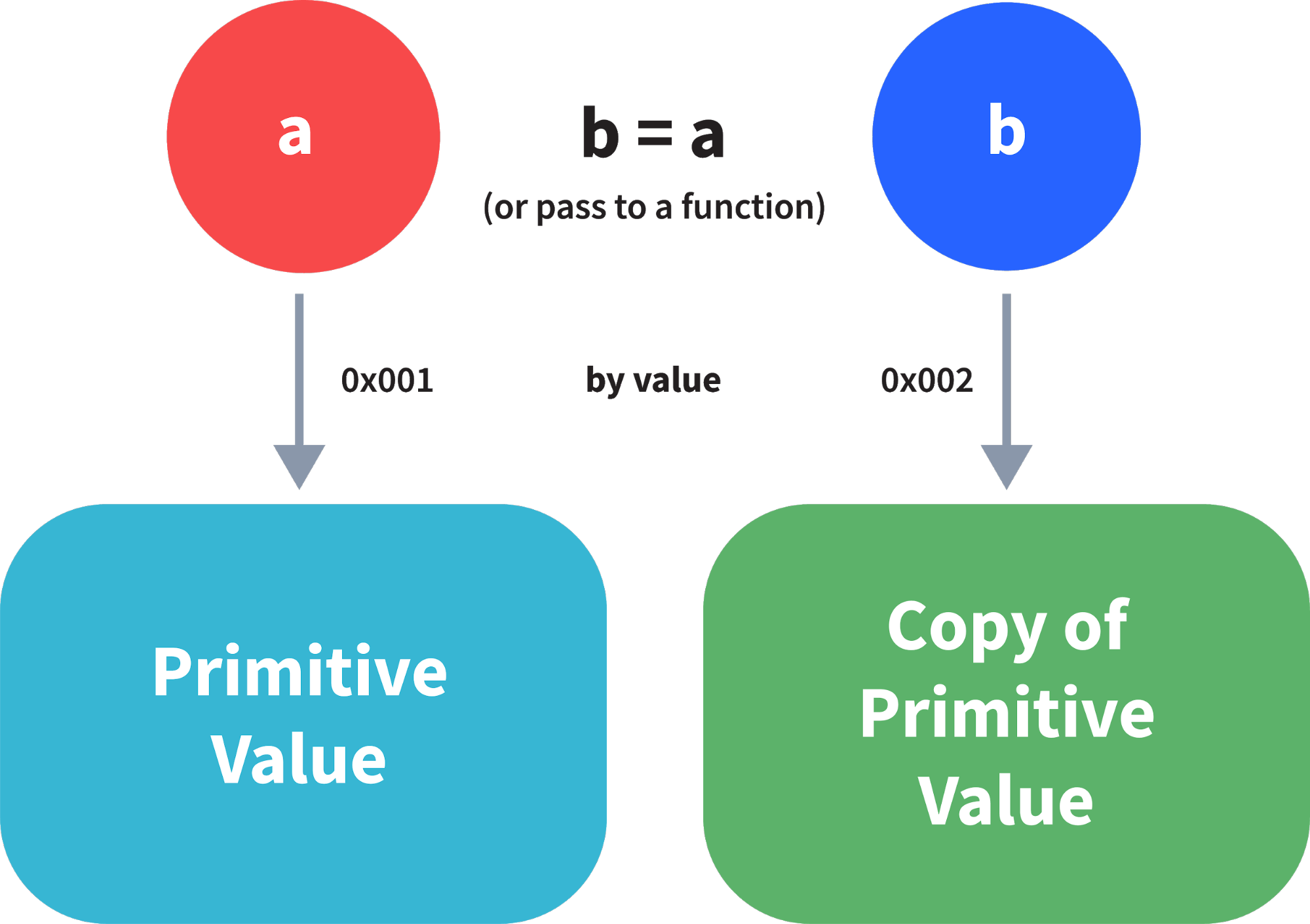
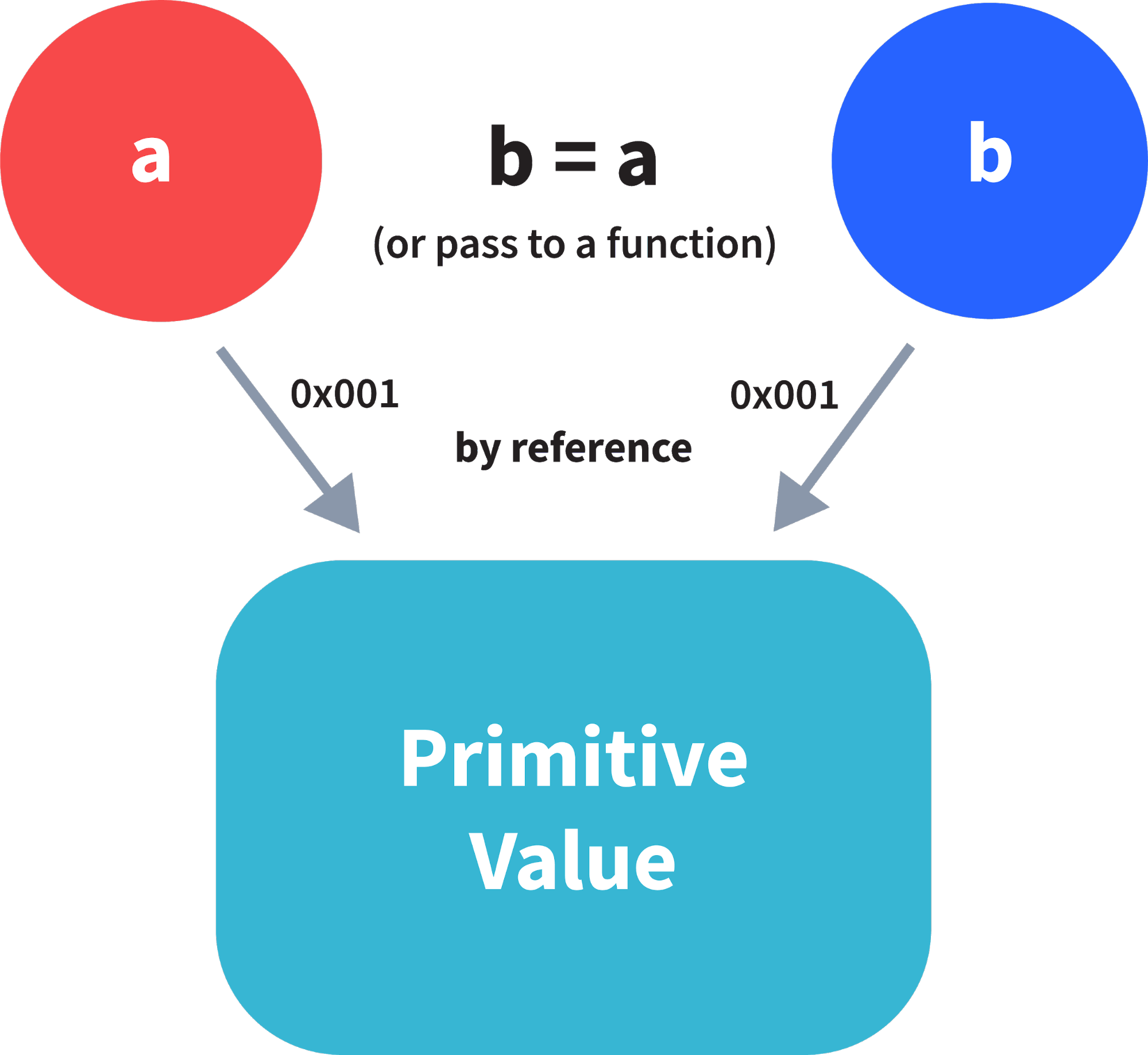
 In JavaScript, primitive data types are passed by value and non-primitive data types are passed by reference.


For understanding passed by value and passed by reference, we need to understand what happens when we create a variable and assign a value to it,
var x = 2;

In the above example, we created a variable x and assigned it a value “2”. In the background, the “=” (assign operator) allocates some space in the memory, stores the value “2” and returns the location of the allocated memory space. Therefore, the variable x in the above code points to the location of the memory space instead of pointing to the value 2 directly.

Assign operator behaves differently when dealing with primitive and non primitive data types,

Assign operator dealing with primitive types:

var y = 234;
var z = y;

In the above example, assign operator knows that the value assigned to y is a primitive type (number type in this case), so when the second line code executes, where the value of y is assigned to z, the assign operator takes the value of y (234) and allocates a new space in the memory and returns the address. Therefore, variable z is not pointing to the location of variable y, instead it is pointing to a new location in the memory.

var y = #8454; // y pointing to address of the value 234

var z = y; 
        
var z = #5411; // z pointing to a completely new address of the value 234
        
// Changing the value of y
y = 23;
console.log(z);  // Returns 234, since z points to a new address in the memory so changes in y will not effect z

From the above example, we can see that primitive data types when passed to another variable, are passed by value. Instead of just assigning the same address to another variable, the value is passed and new space of memory is created.

Assign operator dealing with non-primitive types:


var obj = { name: "Vijay", surname: "Chauhan" };

var obj2 = obj;

In the above example, the assign operator, directly passes the location of the variable obj to the variable obj2. In other words, the reference of the variable obj is passed to the variable obj2.

var obj = #8711;  // obj pointing to address of { name: "Vijay", surname: "Chauhan" }

var obj2 = obj;
        
var obj2 = #8711; // obj2 pointing to the same address 
        
        
// changing the value of obj1
        
obj1.name = "Mukesh";
        
console.log(obj2);
        
// Returns {name:"Muekesh", surname:"Chauhan"} since both the variables are pointing to the same address.

From the above example, we can see that while passing non-primitive data types, the assign operator directly passes the address (reference).

Therefore, non-primitive data types are always passed by reference.

What is NaN property in JavaScript?

 NaN property represents “Not-a-Number” value. It indicates a value which is not a legal number.


typeof of a NaN will return a Number .

To check if a value is NaN, we use the isNaN() function,

**Note- isNaN() function converts the given value to a Number type, and then equates to NaN.

isNaN("Hello")  // Returns true
isNaN(345)   // Returns false
isNaN('1')  // Returns false, since '1' is converted to Number type which results in 0 ( a number) 
isNaN(true) // Returns false, since true converted to Number type results in 1 ( a number)
isNaN(false) // Returns false
isNaN(undefined) // Returns true

Is javascript a statically typed or a dynamically typed language?

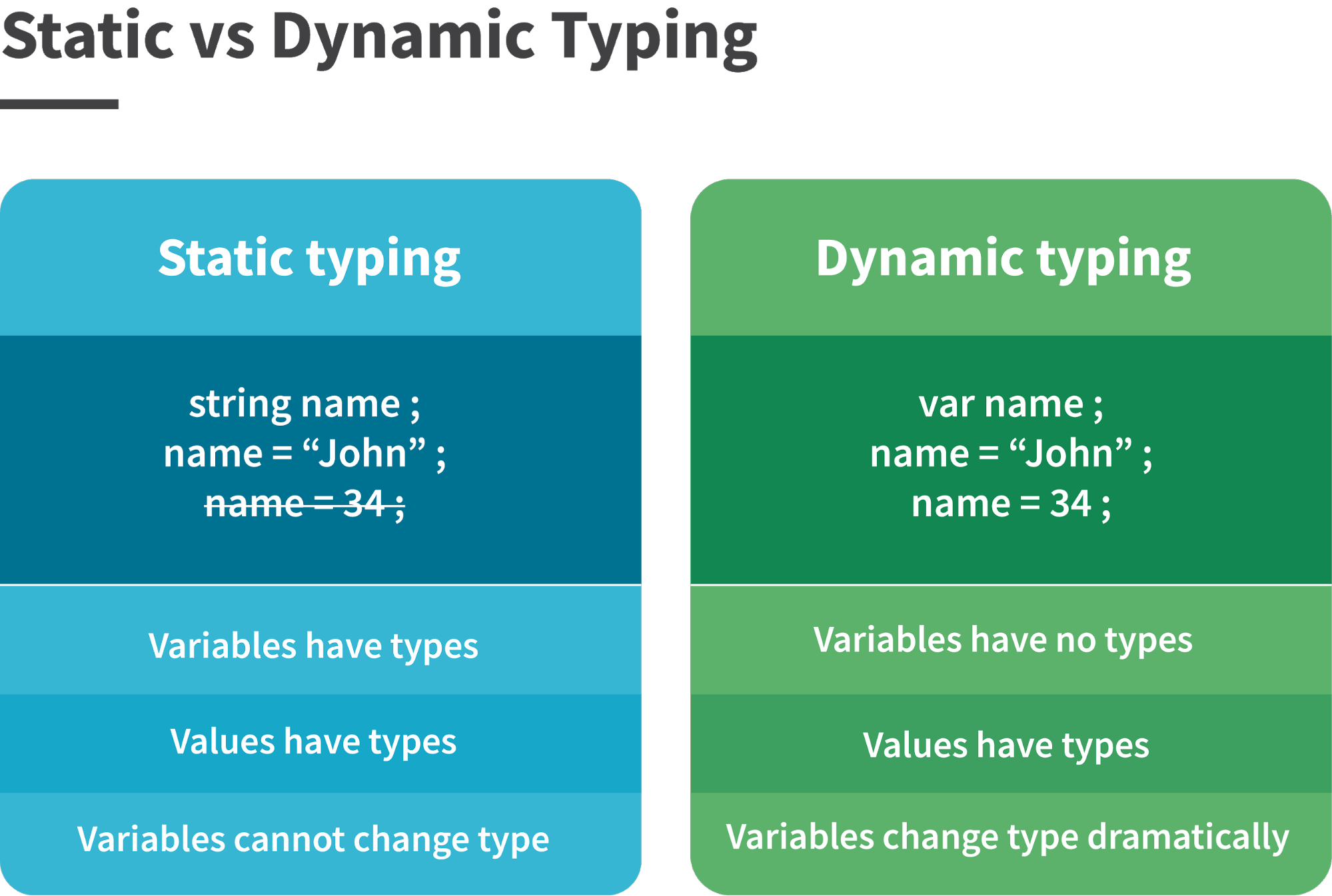
 JavaScript is a dynamically typed language. In a dynamically typed language, the type of a variable is checked during run-time in contrast to statically typed language, where the type of a variable is checked during compile-time.


Since javascript is a loosely(dynamically) typed language, variables in JS are not associated with any type. A variable can hold the value of any data type.
For example, a variable which is assigned a number type can be converted to a string type:
var a = 23;
var a = "Hello World!";

SQL Server — Core Concepts with examples

  Data Definition Language (DDL) : CREATE , ALTER , DROP (tables, views, procedures, triggers). Data Manipulation Language (DML) : SELECT ,...

Best for you